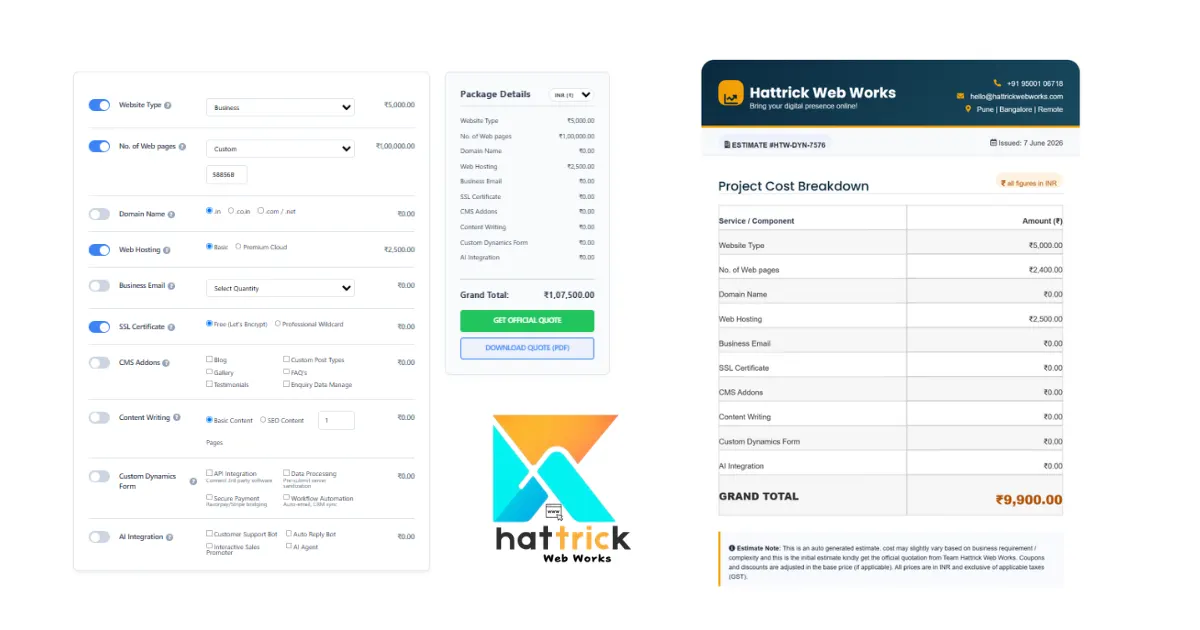
Hattrick Web Works website price calculator gives you a practical estimate of what your website could cost based on your actual requirements, not a one-size-fits-all price. Whether you’re building a business website, an online store, or a custom platform, factors like design, features, functionality, SEO, and ongoing maintenance all influence the final budget.
Using a website cost calculator helps you understand where your money goes, while knowing what affects website design price makes it easier to compare quotes, avoid hidden costs, and choose a solution that delivers real long-term value for your business.
Have you ever asked “How much does a website cost?” you might have come across some responses of ₹10k to even more than ₹10 lakh. Such a wide price range leaves us wondering what should our project cost you actually.
A website price calculator can provide you with a more accurate estimate based on the specific requirements of your site, rather than just random prices or one-size-fits-all estimates. Based on things like pages, complexity of design required and features or integrations you want for your business goals it helps to arrive at a realistic starting point.
But here’s something many pricing guides don’t explain:
Your website is not a product with a price tag: it combines design, development, technology, strategy and long-term business objectives.
And this is the reason why two similar-looking sites can have completely different development costs.
For Example:
- A simple portfolio website may only need a few pages and basic functionality.
- A local business website might require SEO optimization, lead generation forms, and booking features.
- An eCommerce store needs product management, payment gateways, inventory systems, and stronger security.
- A custom business platform may require user accounts, dashboards, APIs, and advanced integrations.
- Although each of these is called a “website,” the amount of work behind them is very different.
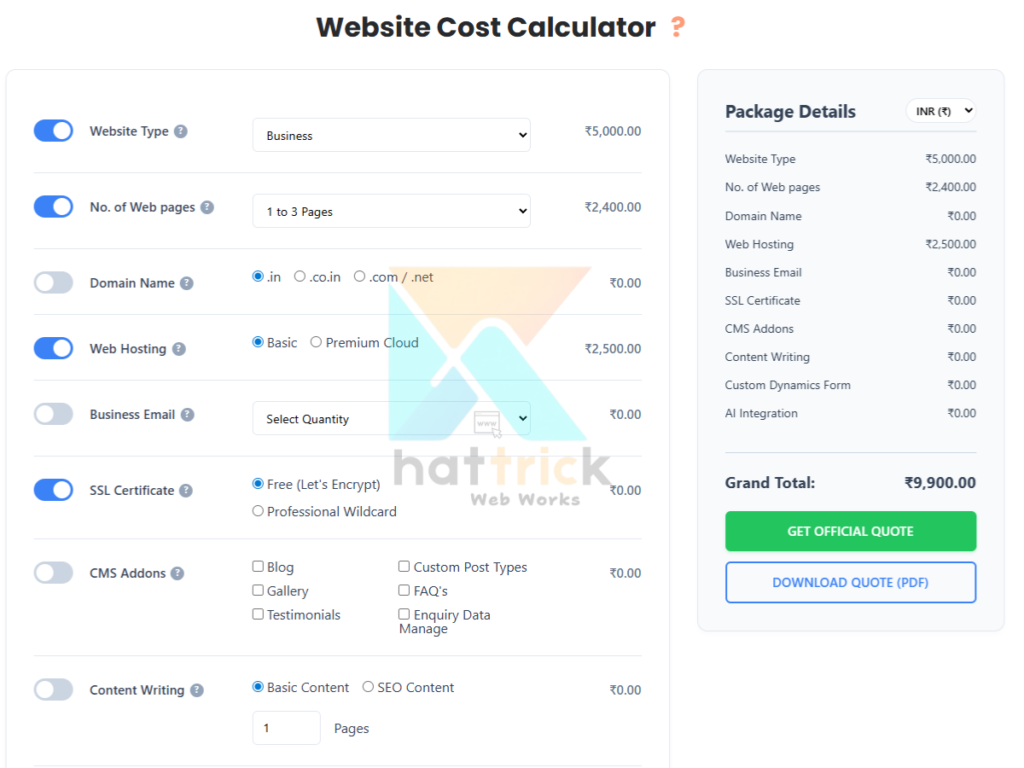
Hence This is the reason behind us building out our Website Price calculator on Hattrick. It estimates your project based on the features and functionality that you actually need rather than showing a one-price-fits-all. This provides you a real budget scope to work with before requesting detailed quotes from development agencies.
As a startup founder, small business owner, marketer, freelancer or enterprise decision maker – this guide will not only help you price websites but also understand how to calculate website prices and why those costs vary so that you can make your best investment decisions.
Get an instant price in our Website Price Calculator, then read below to learn about how professional agencies calculate website prices, what impacts your budget and you can avoid paying for features that might not be necessary.
Why Website Prices Are So Different
Website prices vary because they depend on factors like design complexity, number of pages, custom features, e-commerce functionality, SEO, content creation, integrations, and ongoing maintenance. A basic website costs much less than a fully customized business website with advanced functionality and long-term support.
Why Does One Website Cost ₹15,000 While Another Costs ₹5,00,000?
If you have asked for quotes from various web design agencies, then you’ll find something unexpected:
A Same project can be priced completely differently by the same vendor.
eg:Imagine that You ask three agencies with a brief of your business website requirements.
|
Agency
|
Quote
|
|---|---|
|
Agency A
|
₹20000
|
|
Agency B
|
₹88000
|
|
Agency C
|
₹124000
|
This makes little sense at first glance. They are all in the business of building a website, so why such widely varying rates?
The answer is simple:
Instead, you are not only paying for a website. You’ve put in money for literally everything that goes into planning, designing, building, testing and maintaining it.
Think about buying a house.
For example, two houses with three bedrooms: one of which is much more expensive due to the location it was built in, its quality materials, safety features, and Long-term Value.
Websites work the same way. Two websites may look similar on the surface, but behind the scenes they can be built very differently.
A Website Is More Than Just Pages on a Screen
Many people think a website is simply a collection of pages with text and images. In reality, a modern website is a combination of multiple services working together.
A professional website often includes:
- User experience (UX) planning
- Custom interface (UI) design
- Frontend development
- Backend development
- Mobile responsiveness
- Search engine optimization (SEO)
- Performance optimization
- Security measures
- Contact forms and lead capture
- Third-party integrations
- Analytics setup
- Ongoing maintenance
Each additional requirement will require more planning, designing, developing and testing/quality assurance. This is the reason why similar-looking websites can have completely different costs of development.
The Biggest Pricing Factor Isn't Design - It's Complexity
People think that cost of a website design price is based on Number of Pages. Yes That too Correct. But Number of pages only is not a Actual answer for that Question It’s Completely based on how the page was build-up, What are the Factors(Features, Limitations, what do it, What to add).
The biggest myth is that a beautiful design makes the website expensive. In real life, complexity tends to influence pricing far more than aesthetics.
Consider these two examples.
Example 1: Simple Business Website, A local plumbing company needs:
- Home page
- About page
- Services page
- Contact page
- Inquiry form
This is a pretty simple project because it does not need expensive features.
Example 2: Online Appointment Platform, Imagine a medical clinic, which requires:
- Patient login
- Doctor profiles
- Appointment scheduling
- Calendar synchronization
- SMS and email reminders
- Online payments
- Admin dashboard
- Secure patient records
Both are websites. But the second project takes much more planning, development, testing and security efforts which naturally leads to higher costs. The variation is not the number of pages, it is how much work happens between them.
What Is a Website Price Calculator (and How Does It Work)?
A website price calculator is an interactive AI-based tool that takes all of your project requirements like type of the site, number of pages, design complexity and features speccing it into an im instant cost estimate. A good calculator breaks the number down by category, so you can see exactly what’s driving the total.
The Factors That Really Drive Your Estimate
All website cost calculators base their calculations on relatively similar inputs: it is either business, ecommerce, portfolio or a custom application that you’re trying to build; the proposed page count; design complexity and add-ons like hosting, SSL & content writing. by Changing any one of these, and the estimate changes.
Most calculators also let you toggle template-based design against fully custom design, since that single choice can double or triple the final number. But None of them Combine all the Factors into a Single Piece of solution.
Thats Why Hattrick Web Works website price calculator helps to determine the cost of developing a website based on factors such as website type, number of pages, design, eCommerce features, hosting, domain, SEO, integrations, and other custom requirements. It helps businesses and individuals create a realistic website budget before requesting a professional quote.
The estimate is a starting point, not a fixed development price, because actual costs vary based on project scope, technology, and developer or agency rates.
How Accurate Is a Website Price Calculator?
A calculator is only as accurate as the inputs behind it. Tools built on real, regularly updated market data will land close to what an agency eventually quotes, while tools using static or outdated pricing tables tend to drift.
That gap tends to appear in scope rather than math. A calculator can specifically calculate “5 pages with a contact form,” but cannot (yet) know the readiness of your content, whether it requires an entire design system for your brand or how many rounds of revision it’s going to take before you settle on something all things considered in a scoped quote.
How to Calculate the Cost of a Website: The Core Price Factors
It helps before you lay a finger on the calculator to understand what in fact it is that you’re pricing. Design, functionality and content do most of the work in your cost calculation when creating a website project.
Complexity of design and Page Numbers
The floor is set by the number of pages, but the ceiling lies in design complexity. Because custom means new layouts with systems, UI dedicated and tailored to the brand all naturally take longer so a template-based five-page site vs full web dev build 5 pages can be quite easily over x5 difference.
According to a website cost breakdown by WebFX, agency-quality design is professional-level work that can range widely, typically somewhere between $500 and over $50,000 depending on the size of your site and how customized it will be (for reference: “design” alone can’t tell you much without knowing which end of this price spectrum you’re giving referenceto).
Features and Functionality
Forms, booking systems and payment gateways will all take additional development time over the base design including CRM integrations plus any AI chat tools that it may include too. These should be on a per-feature basis so you can add or remove them individually; bundling everything into one generic “features” slider is deceptive as to how you’re spending your money.
Because each of these is scalable independent from the other, cost guides will group them into clearly defined categories strategy, page count, design & functionality, integrations and content.
Content, SEO, and Ongoing Maintenance
Copywriting, on-page SEO setup and post-launch maintenance are easy things to omit from an initial quote but they often separate a functioning budget from a true one. If SEO services to improve visibility aren’t part of your initial scope, factor in a separate line item for them before launch, not after.
How Website Design Price Varies: Cost Ranges by Business Type in India
Generic dollar ranges from international guides don’t translate cleanly to the Indian market. Here’s what a website design cost calculator should realistically show for common project types in 2026.
Cost Table: Small Business, Ecommerce, SaaS/Portal, Enterprise (₹ ranges)
Generic dollar ranges from international guides don’t translate cleanly to the Indian market. Here’s what a website design cost calculator should realistically show for common project types in 2026.
|
Business Type
|
Realistic Range (INR)
|
What's Typically Included
|
|---|---|---|
|
Portfolio / Landing Page
|
₹8,000 – ₹40,000
|
1–5 pages, template design, contact form
|
|
Small Business Website
|
₹25,000 – ₹1,50,000
|
5–15 pages, custom design, basic SEO, CMS
|
|
Ecommerce Store
|
₹50,000 – ₹5,00,000+
|
Product catalog, payment gateway, cart, admin panel
|
|
SaaS / Custom Web App
|
₹2,00,000 – ₹15,00,000+
|
Custom backend, user accounts, dashboards, API integrations
|
Basic website design services start at ₹3,500 to cover those most basic landing-page builds if your project is on the entry end of that table. On the other hand, while ecommerce website development cost can vary greatly from an online store to another as far as product quantity and payment integration are concerned.
Why Do Different Website Price Calculators Give Different Estimates?
An example of these and vastly different pricing is illustrated by two published India pricing guides: The low-end prices a small business site from agencies between approximately ₹80,000 years ago to about 3 lakh now (based on Zethic’s 2026 Breakdown), while the latter price for new website puts realistic starting range closer to around approx. Both figures are correct, They represent different scopes of pricing.
In summary, the gap can be condensed into 3 questions: freelancer or agency, template or custom and Our tool takes over all-in-one scenario. Any website price estimator you use should allow you to answer all three, or the figure you’re given won’t be worth comparing with your eventual quote.
Hidden Costs that Most Website Cost Calculators Miss
A first-pass estimate never ever usually captures everything you will really incur in year 1. These are all costs that usually appear once the building is already underway.
Recurring Costs After Launch
Individually, items like hosting, domain renewal every year SSL renewals and business email are small but aggregated. real money adds up to a realistic annual cost basis of often 15–20% investment on original build price.
Maintenance (security updates, backups and content changes) is usually an additional recurring line item that you will only find with a lot of digging, most one-off cost calculators do not surface it at all.
Red flags: How to avoid paying too much for a website
Look for quotes where a scope document is not present, pricing that starts from and has no floor on what leads to additional charges; packages without default SEO Setup, Mobile responsiveness or post-launch support. The single best antidote to a project that slips beyond its original budget is having the scope written, line-by-line before any payment.
Is a Cheap Website Worth It? Connecting Cost to ROI
Pricing and value are two different questions. Longer-term, a cheaper website that converts poorly is actually more expensive than one that costs more but performs.
The client of a Chennai-based firm, Jazz Women’s Fitness received tangible improvements with the redesign that led to better performance and user engagement, an outcome from focusing on structure & performance not sticker price. That’s the equation you want to calculate before selecting the low bid on your table.
What the website cost calculator does not tell you
A calculator can help you price features, but it cannot tell you which ones will this move the conversion metric for your business. And it does not take into consideration the presence of your existing brand assets, how ready you are with content or how competitive your market is, which as a result have an impact on the actual return from this investment in websites.
When Should You Ask for a Custom Quote Rather than an Estimate
First use a website price calculator calculator + set a realistic budget range. When you have hard requirements like page count, features, design direction. progress to a scoped quote for the final number important for ecommerce or custom application builds where even minor requirement changes cause large price increases.
Conclusion
Once you understand the basic principles of what drives website pricing (complexity, functionality, content and post-launch considerations) it is no longer a matter of guesswork. $6,750 is the fast and realistic ‘kicking-off’ range price from a calculator; $9,375 is your final number that can be billed to you — in both scopes.
We have real experience here try it with Hattrick’s website price estimator to get an immediate ballpark figure in Indian Rupees, then take a minute to explore our portfolio of over 50 completed projects and see what that investment translates into.
Frequently Asked Questions
Is WordPress Free
WordPress. org is free. No licensing fees. All you need is a domain name (about ₹500 to 1,200 annually in India) and then some hosting plan [from starting at only ₹59/month]. A free domain will usually be included for the first 12 months with most hosting providers, so take note of what is covered in your selected plan and avoid buying a separate package.
How much do I need to setup a WordPress blog Website in India?
On average, a self-hosted website costs around ₹500–₹1,200 per year for the domain and about ₹3,599–₹8,999 annually to get hosted on shared hosting (Shared Hosting). If you are looking for premium theme, or paid plugins then add ₹2,000–₹7,000.
Custom WordPress development for a site built from scratch begins at ₹35,000 and goes up depending on complexity. Want to know an exact number for your particular project? Not Sure How Much Your Website Will Cost? Get an instant, personalized estimate in under a minute.
Blogging on WordPress
Blogging on WordPress is the process of creating, publishing, and managing articles using WordPress, the world's most widely used Content Management System (CMS). It allows individuals, businesses, and creators to publish SEO-friendly content without advanced coding skills.
How to delete wordpress comment
To delete a WordPress comment, go to Dashboard, Then Click Comments, hover over the comment, and click Trash. To remove it permanently, open the Trash tab and select Delete Permanently.
What if I have no knowledge of coding?
No. The WordPress block editor (Gutenberg) is a Drag & Drop(Beginner-Friendly)way for content creators to visually compose their articles. Themes can be configured through settings panels. Plugins install with one click. Build and run entire blog without writing a line of code. At that point, if you want custom functionality then that's where a developer gets value.
Can I make money from a WordPress blog Websites?
Yes, and WordPress imposes no restrictions on the ways. Common options are via Google AdSense, affiliate links, selling digital products like e-books or courses, selling services and/or a full WooCommerce store. Some bloggers make money, and about 37% of them. Roughly 15 percent make it to a full-time income level. The ones that are getting there consistently, have a well defined niche and treat the blog like a business from day 1.
Is WordPress good for SEO?
Yes, WordPress is well-suited for SEO espicially creating for Business or Individuals, Their SEO-Friendly Features and Tools Makes stand out: Clean URL structures, Proper Headings Hierarchy for Blog Post/Pages Used in CreationTools Like Yoast & AIOSEOStrong Plugin SupportCore Web Vitals OptimisationXML SitemapSchema Markup All of this, is coming together as a strong technical backbone. The platform provides the tools for you. The ranks you see, and the real-world use of those devices is what matters.
what is plugin in wordpress
A WordPress plugin is a software add-on that extends the functionality of WordPress without changing its core code. Plugins let you add features such as SEO (e.g., Yoast SEO), eCommerce (WooCommerce), security (Wordfence), caching (LiteSpeed Cache), and contact forms (Contact Form 7) with just a few clicks.
How to make cool CSS animations in WordPress?
To add cool CSS animations, install a plugin like Animate It! for scroll effects, or paste custom CSS into Appearance → Customize → Additional CSS.
-
Plugins (No Code): Use Animate It! (scroll/hover animations), MotionCraft (smooth scroll-triggered effects), or Safelayout Cute Preloader (preloader animations).
-
Customizer: Go to Appearance → Customize → Additional CSS and paste your animation code.
-
Theme Files: Add CSS to
style.cssor a child theme. -
Modern CSS (2026): Use CSS Scroll-Driven Animations API for high-performance, JavaScript-free parallax and scroll effects.
How do you speed up a WordPress site?
To speed up a WordPress site, choose fast hosting, enable page caching, compress images, use a lightweight theme, minimize unnecessary plugins, and deliver content through a Content Delivery Network (CDN). Performance plugins like LiteSpeed Cache or WP Rocket, image optimization tools such as ShortPixel, and testing with Google PageSpeed Insights and Google Lighthouse help reduce loading time, improve Core Web Vitals, and enhance both SEO and user experience.
What is Hattrick web works Website Price calculator
Hattrick Web Works Website Price Calculator is an online tool that estimates the cost of developing a website based on factors like pages, design, eCommerce, hosting, SEO, and custom features.