
Finding the best free web fonts can change how people feel about your website before they read a single word. The problem is that many of the typefaces behind the web’s best-looking brands, like Proxima Nova, Circular, Gilroy and Helvetica Now, come with licensing fees that can quickly add up for freelancers, startups, and small businesses.
Even when you find a font you like, other problems follow. How does it look in dark mode? Does it hold up at small sizes? How do you get it into Tailwind, React, or WordPress without digging through documentation? Designers working in Canva or Adobe face a related problem: a template uses a font they don’t have, and they need a web-safe match that keeps the design consistent.
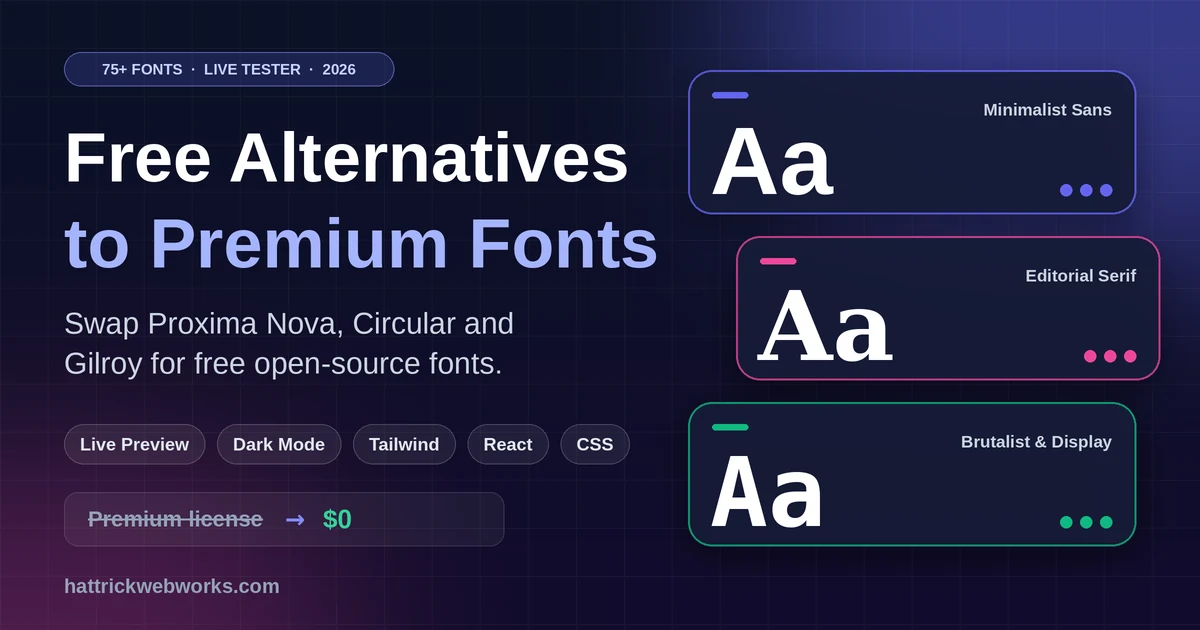
That’s why we built the Hattrick Web Works Font Finder. It’s a free, interactive typography playground with 75+ curated open-source web fonts, live custom text testing, a light/dark mode toggle, and one-click code export for CSS, Tailwind, and React. Think of it as a practical whatthefont alternative for people who want a usable replacement, not just an identification.
In this guide you’ll learn:
- The 7 best free alternatives to premium fonts
- How the Font Finder’s features speed up your workflow
- How to implement web fonts in Tailwind, React/Next.js, and WordPress
- How to fix common Adobe and Canva font problems
Top 7 Best Free Web Fonts: Open-Source Alternatives to Commercial Fonts
You can not expect a free font to be 100% the same as any paid one, thus no clone of an already existing typeface from a designer. You get a well-fitted serif font with the same personality, proportions and tone for no licensing fees. If you’re looking for a replacement typeface, these seven are our most reliable picks among the best free web fonts if you’re searching for a free Proxima Nova alternative or a free Circular Std alternative.
Satoshi: The Best Free Alternative To Proxima Nova.
Satoshi combines geometric precision with quotable grotesque edges, resulting in a modern confident style often seen on SaaS products as well as portfolio and marketing sites. Similar to Proxima Nova, it holds up nicely at both the headline and body sizes with a more modern look. This one is for your brand if you want to have an air of professionalism yet remain relatable.
Inter: A free alternative to Apple’s SF Pro
Newly made for the screen, Inter Due to its large x-height and open letterforms, it’s very well-readable in crowded layout elements which is why it has become a go-to for dashboards or admin panels as well as documentation. If you’re looking for that system-style, SF Pro neutral feel but without the platform restraints Inter is out there for you.
Circular Std: The Best Free Alternatives for DM Sans (font)DM Sans: Typeface Family — 30 Fonts with a Human Touch
DM Sans is a warm, geometric sans serif font that offers great readability: the perfect trifecta you will see in most fintech and startup landing pages. Its soft shapes mirror the warm tone of Circular Std making it a good option whenever you need to give your brand a more friendlier than corporate feel.
Plus Jakarta Sans: The Best Free Alternative To Gilroy
Gilroy has a passion for strong, contemporary headlines that assumes this sort of power; Plus Jakarta Sans does the same. It has angular shapes and bold weights well-suited for hero sections, buttons or any other high-impact UI elements.
Best Free Futura Alternative: Outfit
Inspired by the clean, circular geometry that led to Futura’s success in print, Outfit makes those specialties work for digital. It looks great at display sizes and it stays relatively neat in smaller, shorter text blocks.
Urbanist: Attention all fans of Sofia Pro, its time to download you best free alternative!
Urbanist is a low-contrast geometric sans with an easy-going minimalist vibe. Just like Sofia Pro, it is appropriate for lifestyle brands, creative portfolios and any design that aims to let whitespace and restraint do most of the heavy lifting.
Hanken Grotesk The Best Free Alternative to Helvetica Now related post: Hanken Grotesk
Hanken Grotesk fuses the traditional neo-grotesque structure with a modern, tech-savvy typographic arsenal. A reliable choice if you want the neutral authority of Helvetica Now without the license
Before you commit: Always confirm the license for each font on its source page. Most of these are open-source and free for commercial use, but hosting and distribution terms can differ between providers.
Want to compare them side by side? Test all 75+ of the best free web fonts live in the Hattrick Web Works Font Finder Playground.
Why the Hattrick Font Finder Is Built for Web Developers & Designers
Most directories of the best free web fonts show a static “The quick brown fox” sample and leave you to imagine the rest. The Font Finder was built around how designers and developers actually evaluate type.
Live Custom Text Input & Font Size Slider
You only need to type your actual headline, button label or paragraph just once and all of the 75+ font cards are instantly updated. This type slider allows you to see how each typeface renders live from the small UI labels all the way up to oversized hero text. Judging a random sample is nowhere near as reliable and comparing the different fonts in your actual content renders this comparison fairly redundant; but it also provides you with quickest way to determine problems like weird letter spacing or characters that don’t sit well with your brand name.
Instant Dark Mode & Light Mode Preview
A typeface which sits cleanly on white can appear thin or jarring against dark colours. As dark mode has become a given in modern web apps, verifying contrast early avoids future readability issues. Before the font gets baked into your design system, you can check all this in seconds with one-click switch theme.
Smart Category Filtering & Instant Search
Don’t scroll through 75+ options when you already know the vibe you want. Filter by category, Filter the best free web fonts by style and live preview:
- Minimalist Sans for clean, neutral interfaces.
- Brutalist & Display for bold, attention-grabbing headlines.
- Editorial Serif for long-form reading and magazine-style layouts.
If you already have a name in mind, instant search gets you there faster, which also makes it a handy way to find a web font that resembles a premium one.
1-Click Multi-Format Code Exporter
Once you’ve picked a font, you can export it instantly as:
- Copy CSS for a quick
font-familydeclaration - Export as HTML for a ready-to-paste snippet
- Tailwind Config for your
tailwind.config.js - React / JSX for component-based projects
- CSS
@importfor fast stylesheet integration
This React font exporter workflow removes the copy-paste guesswork that often causes broken font stacks and missing fallbacks.
How to Implement the Best Free Web Fonts Across Tech Stacks
Choosing a font is half the job. Here’s how to get it working in the most common environments.
1. Integrating Web Fonts into Tailwind CSS Projects
If you’re looking for the best free web fonts in the tool, then follow these steps.
- Open the Font Finder and select your font.
- Click Export Code and choose Tailwind Config.
- Paste the snippet into the
theme.extendsection of yourtailwind.config.js. - Load the font files (via
@importor a<link>tag) so the browser can render them.
A typical result looks like this:
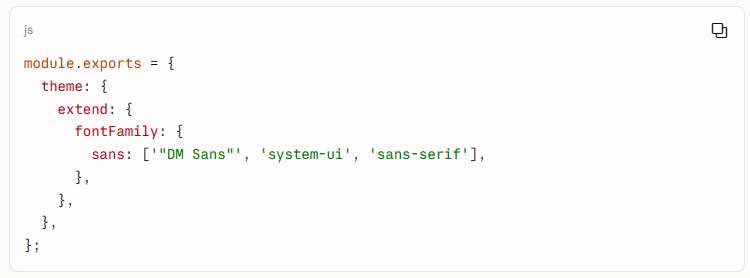
Now every element using font-sans renders in your chosen typeface, with sensible fallbacks if the font fails to load.
2. Using Fonts in React & Next.js Applications
In React, the cleanest approach is to load the font once at the application level and apply it through a class or CSS variable. In Next.js, the built-in font module handles optimization and self-hosting for you:
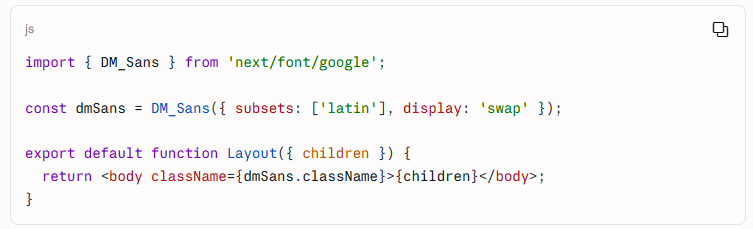
Fonts distributed outside Google Fonts, such as Satoshi, are typically self-hosted using local font files. The Font Finder’s React / JSX export gives you a clean starting point either way.
3. Adding Custom Fonts to WordPress & Hostinger Sites
You don’t need a plugin to change your site’s typeface. Copy the CSS @import snippet from the Font Finder and paste it at the top of your stylesheet under Appearance → Customize → Additional CSS:
@import url(‘https://fonts.googleapis.com/css2?family=DM+Sans:wght@400;500;700&display=swap’);body {
font-family: ‘DM Sans’, sans-serif;
}
The display=swap parameter helps text appear immediately while the font loads, which supports better perceived performance.
Need a faster, fully custom build? If you’d rather hand off typography, performance, and technical SEO to specialists, explore Hattrick Web Works Custom Development Services.
Troubleshooting Missing Fonts in Adobe & Canva ⚠️
Font problems aren’t limited to websites. Here are two common headaches and how open-source alternatives can help.
Fixing “Adobe Error: Cannot Find or Create the Font”
This message appears in Acrobat and Illustrator when a PDF references a font that wasn’t embedded and isn’t installed on your machine. The text may display incorrectly or become uneditable. A few approaches usually solve it:
- Enable local system fonts in Acrobat’s preferences so it can use fonts installed on your computer.
- Install a close open-source equivalent and substitute it for the missing premium font.
- Embed fonts on export in future files so the problem doesn’t recur.
If the original is a paid typeface you don’t own, a free match like Satoshi or Inter is often the fastest fix. Use the Font Finder to preview candidates with your own text before you swap.
Matching Canva Graphics with Web Fonts
Brand consistency breaks down when your Canva graphics use one typeface and your website uses another. If you’re searching for a Canva font finder, the practical approach is to identify the closest visual match to your Canva template’s font, then use the same open-source font on your website. Test the candidates with your real headline text in the Font Finder, check them in dark mode, and export the code. Your social graphics and landing pages will feel like one cohesive brand.
More Free Web Development Tools by Hattrick Web Works!
Hattrick Web Works builds free, high-performance utilities for agencies, freelancers, and business owners. Once you’ve settled on your typography, these tools help with the next steps:
- Website Cost Calculator: Estimate your web development budget based on features, design complexity, and e-commerce needs.
- QR Code Generator: Create customized, high-resolution QR codes for marketing materials and landing pages.
For more technical guides and tutorials, visit the Hattrick Web Works Blog Hub.
Not sure which route to take? Compare your options before you commit to a font.
| What you need | Premium font licences | Font ID tools (e.g. WhatTheFont) | Hattrick Font Finder |
|---|---|---|---|
| Cost | Licence fees, often per site or per user | Free | Free |
| Finds a free replacement | No | Identifies the font only | Yes, 75+ curated alternatives |
| Test your own text live | Limited to the vendor's preview | No | Yes, with a size slider |
| Light and dark mode preview | Rarely | No | Yes, one click |
| Export CSS, Tailwind, React | Manual setup | No | Yes, one-click export |
| Commercial use | Depends on your licence | Not applicable | Open-source (check each font's licence) |
Still unsure? Test the best free web fonts live with your own headline and decide in minutes.
Frequently Asked Questions
Are all fonts in the Hattrick Font Finder free for commercial use?
The fonts featured are open-source and intended for free use in commercial web and mobile projects. As a best practice, check each font's license on its source page, especially if you plan to self-host or redistribute font files.
How do I export font styles directly to Tailwind CSS?
Select your font in the Font Finder Tool, click Export Code, choose Tailwind Config, and paste the generated snippet into your configuration file.
What are the best free web fonts to replace Proxima Nova or Circular?
Satoshi and DM Sans are two of the best free web fonts for replacing Proxima Nova and Circular Std.
How do I fix the Adobe "cannot find or create the font" error?
Enable local system fonts in Acrobat preferences, or swap the missing commercial font with an open-source equivalent from our tool. Embedding fonts when exporting future PDFs prevents the issue from returning.
Final Thoughts: Try the Font Finder Today:
With our best free web fonts, Great typography doesn’t require a premium license. With the right free alternative, you can match the polish of expensive typefaces while keeping costs and page weight down. Testing fonts live with your own text, in both light and dark mode, saves hours of trial and error and helps you ship a more readable, more consistent site.
Try the Hattrick Web Works Font Finder now to preview 75+ the best free web fonts in dark mode and export production ready code in seconds!