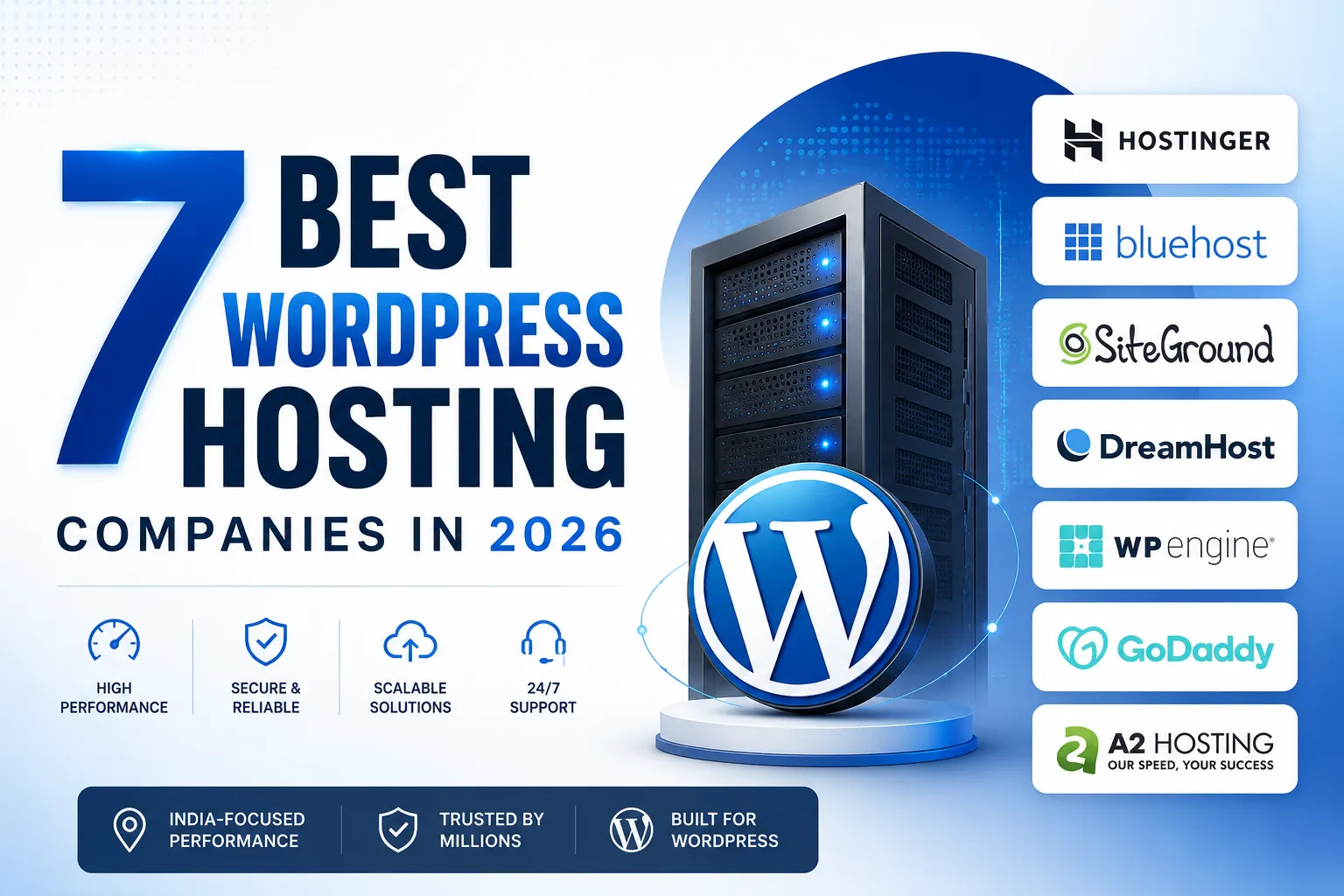
TL;DR: From The 7 best WordPress hosting company in 2026 Provides you a Complete Guide on Each Provider.
- Hostinger is the top choice for beginners for its affordable pricing, India-based servers, free SSL, and beginner-friendly dashboard.
- For starters, Bluehost is the best Option – WordPress.org officialy recommended this.
- DreamHost Perfect for multiple websites, while Cloudways is ideal for WordPress/WooCommerce stores + growing businesses that require scalable cloud infrastructure powered by DigitalOcean, AWS or Google Cloud.
- For premium managed WordPress hosting, SiteGround, Kinsta, and WP Engine deliver advanced security, automatic backups, superior performance, and expert support.
- Before you make a decision about which provider to go with, consider comparing the following server location and uptime as well as renewal pricing, performance scalability along with managed hosting features so your website will load faster have better SEO for long-term growth.
There are hundreds of web hosting options for WordPress, and choosing wrong locks you into an expensive mistake for years. So I spent weeks testing the 40 biggest hosting providers to find the best WordPress Hosting Company. Most were awful, but only Seven stood out as the most popular and Preferable options for WordPress.
This guide compares every major WordPress Hosting Company based on speed, uptime, pricing, support, server location, scalability, and long-term value for Indian website owners.
At the End of this Comprehensive Guide of finding the best WordPress Hosting Company, you’ll know exactly which web host is best for you based on what matters most for your website.
While choosing a web host for WordPress, performance Based on two key things, how fast your website loads, and how reliably it stays online. Think of it like a physical store. You want your doors open consistently and customers served quickly. Let’s start by seeing how fast these hosts are.
Almost 42% of all websites are now powered by WordPress, meaning that millions of business have trusted their blogs, portfolios and online stores on this tool to date (October 2023). However, it is one of the quickest ways for killing a new site as slow load times, dealing with downtime too often or non-intuitive dashboards are things that will ultimately drive newbies away before they have even got their first post up.
How to Choose WordPress Hosting Company (Before You Purchase)
Not Every WordPress hosting company are created equal. Before We Compare individual providers, it is worth understanding those few things that actually matter in terms of how fast your site will be for visitors.
We compared each hosting provider based on the factors that truly matter when choosing hosting for your website – not on high affiliate commissions or brand popularity.
Each provider in this guide was evaluated by:
Entry and renewal pricing
Server performance and uptime
Indian data center availability
WordPress optimization
Ease of use for beginners
Customer support quality
- Scalability for growing websites
It is important to note that our recommendations are informed by suggested best practices for WordPress which you can find here, available specs from various hosting companies, many years of actual client experience creating websites on the built-in WordPress environment and performance metrics sourced from industry experts in published benchmarks.
Does Server Location in India Actually Matter for Speed?
Yes, having a server closest to your audience is one of the most underrated aspects while deciding WordPress hosting for INDIAN Audience.
This is more than what most beginners understand. Your hosting server location impacts TTFB (Time to First Byte), page loading speed, and user experience directly. If your server resides in Mumbai or Delhi versus the US/europe, data needs to travel less distance thus meaning lower TTFB for local visitors.
To overcome this network latency, it makes sense to choose the One which has all of its data centers in or near India. With reduced latency, you will benefit from better Core Web Vitals which means improved SEO performance and higher conversion rates.
Studies reveal that conversion rates drop off substantially by seconds of load delay, and a slower site will also have meaningfully higher bounce rates. Recently, Jazz Women’s Fitness, a client of Hattrick Web Works who saw Measurable Performance and Engagement Improvements from usability-focused redesigns.
Shared Hosting vs Managed WordPress - Which Should Beginners Choose?
With shared hosting, your site lives on a server with dozens of other websites, and all those sites have to share the same resources. This is the cheapest option and fits well as a blogging, portfolio or small business site with low traffic.
Managed WordPress Hosting is a premium hosting service designed specifically for WordPress websites. This is in contrast with the shared hosting plans that are not including automatic wordpress updates, caching layer, security features and daily backups as well as performance optimization.
Well, a managed WordPress Hosting Company will also monitor server health and do all the technical upkeep to make sure that you can focus on your content publishing so that you aren’t distracted by infrastructure management.
Our guide on how to start a WordPress blog goes into more depth about these things, but generally speaking: go with shared or entry-level WordPress hosting for your first site. but as soon as you have traffic or revenue that warrants it, graduate to managed hosting.
Those low-traffic Siteground hosting is amongst the Best WordPress Hosting for beginner and Budget websites.
Automatic Backups : A reliable WordPress Hosting Company will do automatic backups, in case of any accidental changes or malware attack or server failure.
This means that, in the case of trouble or malfunction during an unexpected event such as a hack attempt or data-loss accident, this would allow website owners to quickly restore their site and create minimal downtime for users whilst losing next-to-no-data.
Best WordPress Hosting for Beginners and Budget Websites
If you are looking to set up your first WordPress site, these 3 providers provide the simplest installation process along with affordable pricing.
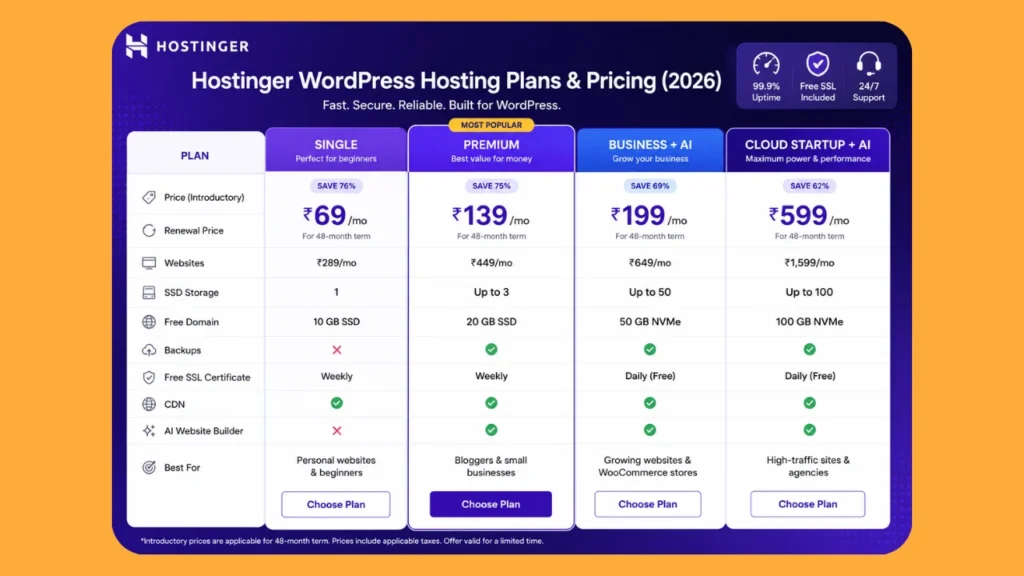
If you need a host for your first WordPress website, then Hostinger is the best value for money considering cost speed and ease of use. This is the WordPress Hosting Company that we recommend most often to new businesses as it also provides amazing value for money without compromising on quality.
Hostinger - PERFECT FOR BEGINNERS[Best Overall]
Hostinger is one of the top Affordable WordPress hosting in India, not only because of their pricing but also you’re going to get an infrastructure modernly. Its hPanel dashboard is simple to use compared with traditional cPanel setups, making it a comfy place for those that have never managed a website.
The plans generally feature free domain, SSL and in-built caching, as well data centers options such as India, cutting latency for local visitors. It especially fits bloggers, freelancers and small company owners who are looking for stable performance without needing to spend hours figuring everything out.
An SSL Certificate secures the information going between your site and visitors, preventing attackers from accessing or inserting sensitive data into communications; this improves overall trust on both sides.
As noted above, modern browsers classify sites without HTTPS as “Not Secure”. To enhance the security of a website and to effectively aid in ranking factors, free SSL certificates come built-in with most top WordPress Hosting Companies.
Bluehost - Officially Recommended by WordPress.org
WordPress.org officially recommend Bluehost , which provides a level of trust for first-time purchases and those who do not know where to begin. But in practice, headline speed is less relevant for a site that only needs to be online; independent tests show Bluehost returning consistently good uptime over long test periods.
The setup wizard helps you set WordPress up, select a theme and configure basic settings. Can be useful for those who like a more structured, guided first experience. The trade-off: Bluehost has its core servers located outside of India, so visitors here may experience fractional higher load times than India-first hosts.
If you need a simple WordPress setup, which is officially recommended by WordPress.org. If you are creating your first WordPress website, with minimal technical experience and you want a guided installation process along with an easy-to-use dashboard to help get started quickly plus reliable support then this is the solution for you.
DreamHost: Best for hosting multiple sites at low prices
DreamHost is for you if planning a run WordPress with more than one site in a single plan. DreamHost is a reliable WordPress Hosting Company for users planning to manage multiple websites.
Most of its plans feature unlimited sites at no extra charge. And also allows you a longer money-back window than most of the competition so that you’ve got space to try out the platform without feeling rushed.
Tickets are the main method of support, not 24/7 live chat. Good to know in advance if you need quick response. It’s a still a good entry-level option for those looking at single, simple blog or business site where price is Considerable.
Ok, Lets See Which Provider are Optimum for growing businesses and high traffic sites
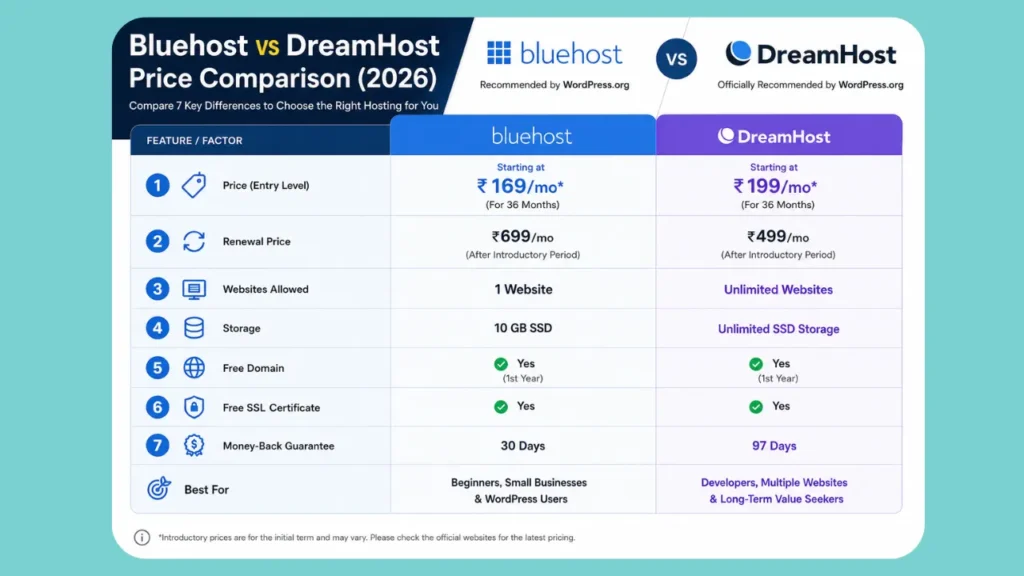
DreamHost is an amazing offer in the long run if you intend to host multiple websites under 1 account. Includes generous storage, unlimited site support on higher-level plans and one of the longest money-back guarantees in the business — it's a solid pick for developers, bloggers or entrepreneurs managing multiple WordPress projects.
Which WordPress hosting company is best for growing businesses and high-traffic sites
However, as soon as your site starts getting regular traffic or you are operating an online shop, entry-level shared hosting will start to show its weaknesses. These four providers are made for that next level.
Cloudways: best for Scaling and WooCommerce Traffic
Cloudways is a cloud-based WordPress Hosting Company designed for businesses that need scalability. It has taken a completely opposite route. It lays a managed experience on top of major cloud providers, such as DigitalOcean, AWS and Google Cloud rather than owning its own servers.
That provides cloud-level performance and scalability without setting up the servers by yourself. It makes it a great option for WooCommerce stores, which now account for a large portion of the global ecommerce market running on WordPress.
Unlike shared hosting, where resources are rationed out based on demand spikes during a sale or busy time of year and cannot be resized automatically.
What is CDN performance?
A CDN (Content Delivery Network), like Brave, saves copies of your site on global servers. When people visit your site (or any URL associated with the CDN), content is repeatedly pulled from the closest server thereby minimizing latency, and improving loading speed.
Cloudflare CDN or similar type of their own ones are there with every premium WordPress Hosting Companies forcing not only better performance world wide.
Understanding SSD vs NVMe Storage
This is used by almost all of the modern WordPress Hosting Companies in these days just like SSD or NVMe SSD storage. NVMe storage has faster read and write speeds than SATA, producing a more responsive WordPress dashboard, better databases performance and improved page loading times. It is more valuable when it comes to WooCommerce stores and origin site with high traffic.
Cloudways is or number one for businesses who wants flexibility and performance. Using premium cloud providers (DigitalOcean, AWS and Google Cloud) as the infrastructure backbone, it scales websites instantly during times of transient traffic spikes. It is especially ideal for WooCommerce stores, agencies and businesses where speed impacts sales and UX in a substantial manner.
SiteGround: reliable all-rounder beyond WordPress
SiteGround is powered by Google Cloud Platform infrastructure and has established itself as a recommended option amongst developers agencies for its consistent uptime record and auto-recovery from outages. It is pricier than the cheapest hosts on this list.
Site owners who care much more about stability than the lowest price out there will certainly be drawn in by its infrastructure quality and staging tools.
Fairly picked when you have outgrown beginner holding however pre fully admin system.
Finding the right balance between price, reliability, security and support is a tall order but SiteGround does this as well any hosting provider on the market today. It runs on Google Cloud infrastructure with native caching and developer-friendly tools, is ideal for professional websites that need reliable uptime.
Kinsta and WP Engine: top selections for agencies + high-traffic
Both Kinsta and WP Engine are premium Managed WordPress platforms. We take care of server level caching, security hardening and automatic scaling so that your team can focus on content and growth. Both also offer staging sites and a helpdesk with WordPress experts.
These platforms are also pricier than shared or cloud hosting. But they remove server maintenance from you almost all together. They suit agencies that manage multiple client sites, or a business where downtime represents an actual loss of revenue.
WP Engine best suited for advanced workflows with scalable infrastructures, agencies and developers or enterprise-level businesses. It also offers potent staging environments, developer-friendly tools, best-in-class security features and managed performance optimization making it optimal for organizations overseeing large numbers of WordPress websites or mission-critical digital platforms.
LiteSpeed Web Server offers page rendering speeds, not found on traditional Apache servers and much of the best performance hosting providers are using it. When paired with LiteSpeed Cache, it lowers server response time and boosts cache performance; enabling WordPress websites to obtain better Google PageSpeed Insights scores on Core Web Vitals.
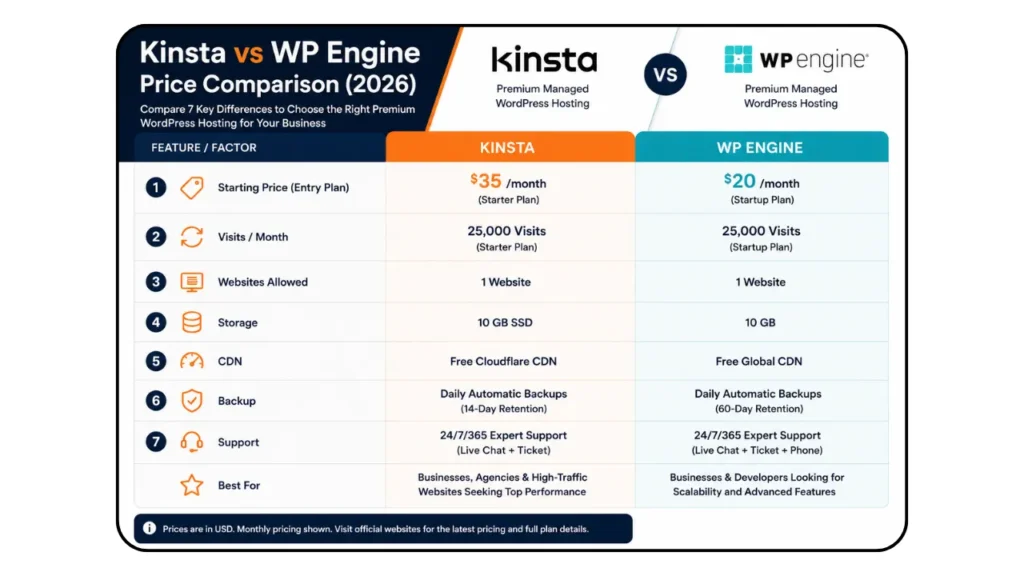
Kinsta is one of the best premium managed WordPress hosts you can get if performance and reliability are crucial for your business. Backed by Google Cloud's Premium Tier network, it offers lightning-fast performance, enterprise-level security analytics and uptime monitoring plus automatic backup solutions with industry-proven WordPress technical support making them a perfect option for medium-to-large websites as well.
Comparing Top WordPress Hosting Company in India (2026)
The below table compares starting prices across these seven hosts, based on a similar level WordPress plan with an entry-level monthly price for the host available to buyers in India.
| Hosting Company | Typical Starting Price | Best For |
|---|---|---|
| Hostinger | ₹149–₹299/month | Beginners and bloggers |
| Bluehost | ₹199–₹349/month | First-time WordPress users |
| DreamHost | ₹350–₹500/month | Multiple websites on one plan |
| Cloudways | ₹800–₹1,500/month | WooCommerce and traffic scaling |
| SiteGround | ₹700–₹1,200/month | Reliability-focused small business |
| Kinsta | ₹3,000+/month | High-traffic managed hosting |
| WP Engine | ₹3,500+/month | Agencies and enterprise sites |
Renewal pricing is typically higher than the first-term promotional rate across nearly every provider on this list, so always check the renewal cost before committing to a long-term plan.
Getting the Right Hosting for Your WordPress Website
In that scenario, which host you go with as they start offering seven options at a time, Every WordPress Hosting Company offers different strengths depending on your business goals Like Your Requirement of your site and basedon your budget. but not the one with the most features on paper.
Not every website needs to stay DIY forever. If you’re planning to upgrade your WordPress site with professional design, custom development, or SEO, check out our guide on how to choose the best web design company before making your decision.
Best WordPress Hosting Company for a Small Business Website
Most Indian small businesses would do well with a decent mid tier plan from either Hostinger or Cloudways. If your site is more of an information based(Like Non-Profit Blog) website that doesn’t get a lot of traffic going to it Hostinger will work out fine.
If you run WooCommerce or need to fit your traffic spikes, Cloudways is a better choice. That means if your site generates leads, you should prioritize guaranteed uptime and India-based servers over rock-bottom sticker price.
Downtime and sluggish load times quickly become an inquiry lost.
A simple blog does not require as much server resources as running an online store. Ideal WordPress Hosting Companies For WooCommerce on very scalable infrastructures, faster databases with object caching and daily backups to support product catalogs / customer accounts or payment processing.
Most hosting providers have the option for a free migration feature, meaning users can transfer their WordPress sites with no downtime. An expert migration service performs the transfer of website files, databases, emails and configurations while maintaining SEO performance over a minimal business disruption.
A uptime guarantee is a measure of how consistently your hosting provider will keep your website online. All major WordPress Hosting Companies promise 99.9% uptime, you should not experiencing any downtime that brings negative effect on user experience as well affecting search ranking and getting sales if its an eCommerce site.
Should you pay more for managed WordPress hosting?
Which of course depends on how valuable your time is and what impact your site has (or, hopefully soon will) in driving revenue.
Managed hosting – whether it is from Kinsta or WP Engine – will save you the hassle of needing to think about updates, security patches and performance tuning once your site starts generating real business value for a few extra bucks.
If you have a personal blog or are just starting out with your site and receiving low levels of traffic, the additional expense typically won’t be justified. This is fine whilst you are still on shared or entry-level hosting.
Recommended next read: Once your website is live, follow our WordPress Security Checklist to protect it against malware, brute-force attacks, vulnerable plugins, and other common WordPress security issues.
If You’re Choosing Hostinger You’ll get Additional 20% Off By Using This Code: 7LWPRABAK1VY
Conclusion
While Choosing Hostings, server location and uptime history make more difference than promo discounts – Without mentioning renewal pricing(Pay Attention For that Too).
After Buying an Hosting For your Website Here is a Complete Step-by-step tutorial about How to Start a WordPress Blog Website This Comprensive Guide Contains
- Reason why Most people choose wordpress
- Selecting a Profitable Niche & Domain
- Selecting a Correct Theme for your Need
- Necessory Plugins to install
- Creating own Ideas in WordPress
- Checklist Before Publishing a Post
- What-to-do After Published?
Having a reliable host is only part of the development – all it really does is provide you with professionally built WordPress website development, which means your site has at least some degree of optimization to take advantage of that infrastructure.
Hattrick Web Works has Scaled 50+ businesses to gain online visibility with websites built for performance, and our User-friendly team is available should you need assistance in planning yours.
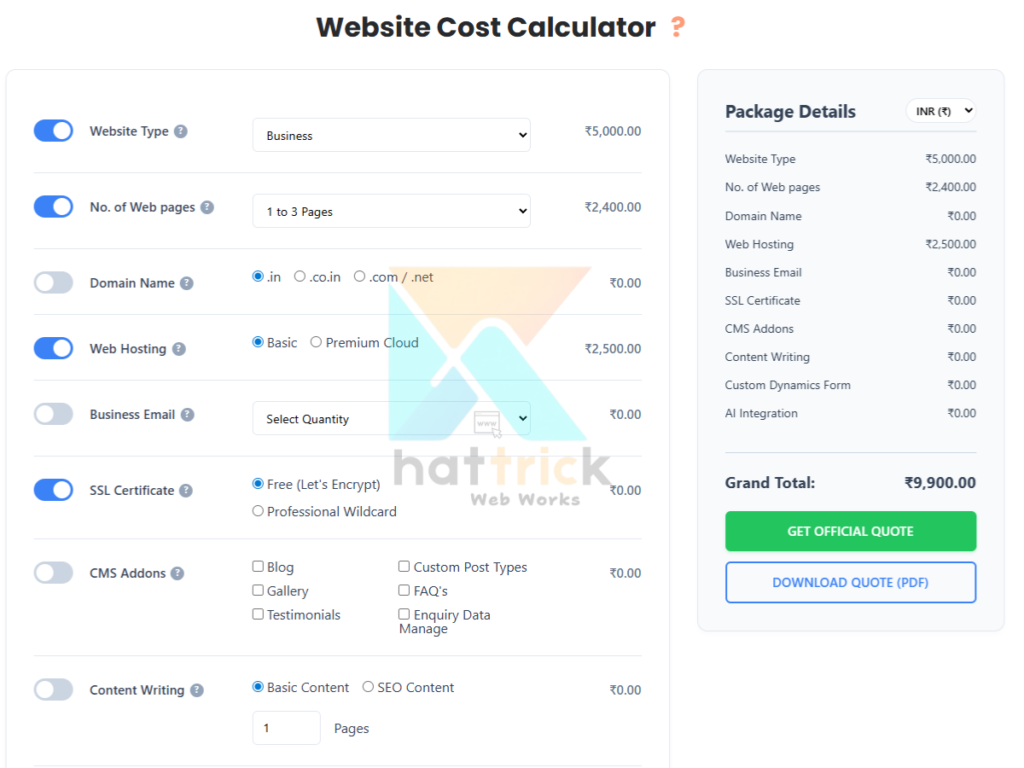
Before Contact us about your project use our website cost calculator(based on current market price and Real Data across All top Plaforms.) to find out a proper estimate for building your WordPress site taking into account all individual factors.
Frequently Asked Questions
What is web hosting?
Web hosting is a service that stores your website's files on a server and makes them accessible to visitors on the internet.
What are the different types of hosting services?
The main types of web hosting services are:
- Shared Hosting: Most cost-effective, as multiple websites share the same server resources. Best for small blogs and personal sites.
- VPS Hosting: Offers dedicated resources within a virtual environment for better performance and control than shared hosting, at a moderate price. Ideal for growing businesses.
- Dedicated Hosting: Provides an entire physical server exclusively for your site, delivering maximum performance, security, and control. Best for high-traffic sites and large enterprises.
- Cloud Hosting: Distributes your site across multiple servers for high reliability, scalability, and uptime. Perfect for sites with fluctuating traffic.
- Managed WordPress Hosting: A specialized service that handles all technical aspects (updates, security, caching) specifically for WordPress, so you can focus on content.
Which is the best WordPress hosting Company for a small business website?
For most small businesses in India, a mid-tier plan like Hostinger or Cloudways Matches Best among other WordPress Hosting company. Hostinger Provides Beginner-Friendly and Affordable Options While Cloudways fits better if you're running WooCommerce or expect seasonal traffic spikes
Hostinger or Bluehost - Which Is Best?
When it comes to value, performance and speed Hostinger wins for India better than bluehost due to its Indian data centres but if you ask me which is most reliable, then Bluehost benefits from officially being recommended by WordPress.org
What is the cost of WordPress hosting in India?
The Entry point for shared WordPress hosting plans ranges from ₹149 to ₹350 a-month in India. Cloud & managed alternatives range from ₹800 to upwards of 3,500 a month depending on the service provider and resources.
What is the difference between standard and WordPress web Hosting?
Standard Web Hosting is general-purpose, offering flexibility to host any website, but requires you to manage performance and security yourself.
WordPress Hosting is specialized, offering optimized speed and security with automatic updates and expert support built specifically for WordPress.
What is Shared Hosting?
Shared Hosting is a service where multiple websites reside on a single physical server, sharing its CPU, RAM, and disk space.
It is the most cost-effective option, but performance can be inconsistent because other sites on the server can consume resources and slow yours down.
How to choose the right hosting company for your WordPress website
With seven options on the table, the right pick comes down to matching the host to your site's current stage.
Is it worth paying more for managed WordPress hosting?
Managed WordPress Hosting removes all technical burdens by handling automatic updates, daily backups, advanced caching, and proactive security monitoring for you.
It is definitely worth the extra cost if you run a business, e-commerce store, or high-traffic site where speed, uptime, and security directly impact revenue, but it is overkill for a simple personal blog with low traffic.
What steps are involved in migrating a website to a new host without downtime?
Migrating a website without downtime follows a "copy first, then switch" strategy: keep the old server live, copy everything to the new server, test thoroughly, and then point your domain to the new server.
Here are the steps:
Preparation Phase: Lower your domain's TTL (Time-To-Live) to 300-3600 seconds (5 minutes to 1 hour) at least 24 hours before migration, so DNS updates propagate faster.
Migration Phase:
Backup: Create a complete backup of all files, databases, email accounts, and SSL certificates from the old server.
Copy: Upload all data to the new server (manually via FTP, using a migration plugin, or through your new host's auto-migration service).
Test: Access your site using the new host's temporary domain or IP address and verify everything works correctly.
Go-Live Phase:
Switch DNS: Update your domain's A record to point to the new server's IP address.
Keep Old Server Active: Do not cancel your old hosting until DNS fully propagates (usually 24-48 hours) to serve visitors still using the old IP.
Finalize: Once DNS propagation is complete, safely shut down the old server.